

Broad Match Search Phrases
In many types of ads campaign, you can choose to target specific search phrases (often identified through keyword research.) These tell Google the type of searches you want your ad to display for.
However, it’s not a case of just adding a keyword and leaving Google to do the rest. There are three targeting options available to you: broad match (the default option), phrase match and exact match.
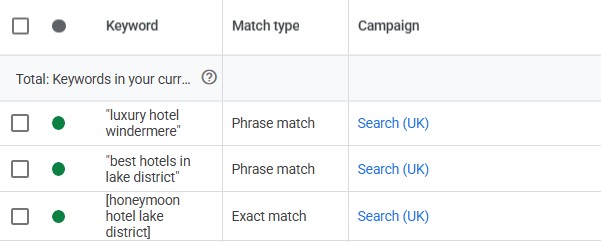
Because broad match is the default, many small businesses will choose this and leave it at that, but that can be a costly mistake. What this option means is that Google will show your ad for the specific keyword, and also for lots of other keywords that are similar or related to it. But what Google considers relevant is not necessarily right for your business or ad.
For example, if a business is a wedding venue in the Lake District, they might target the phrase wedding venue lake district. If they choose broad match targeting, an additional targeted keyword could be wedding venue yorkshire dales. You can see how this phrase could be considered a broad match, but it’s not very helpful for a business that only has a venue in the Lake District. Any ads shown for Yorkshire-based searches result in wasted budget.
What to do instead: Try using phrase match and exact match targeting instead. These will narrow down the searchers you reach, but should increase conversions. If you do decide to use a broad match, keep a close eye on your keyword list and make sure you add plenty of negative keywords.
Lack of Audience Targeting
Every business has a target audience – demographics that the majority of your customers will closely match. Ignoring those demographics in your ad targeting can mean that your ads get shown to everyone and anyone, even if they’re completely irrelevant to your business.
For example, the owner of a large luxury holiday cottage will want to target people with high income, who may have large families (or who are known to go on group holidays), and show an interest in the location.
By ignoring audience targeting in your ads campaign, you’re spending money showing ads to people who are highly unlikely to click on them or, if they do, are unlikely to make a purchase.
What to do instead: Get to know your audience demographics and use that knowledge to target your ads. Google has a good number of options for limiting an audience to those who are more likely to convert. With the appropriate GDPR compliance, you can also upload a list of past and existing customers to help Google understand the type of people you want to target (and to avoid showing ads to people who already buy from you).
Incomplete Conversion Tracking Setup
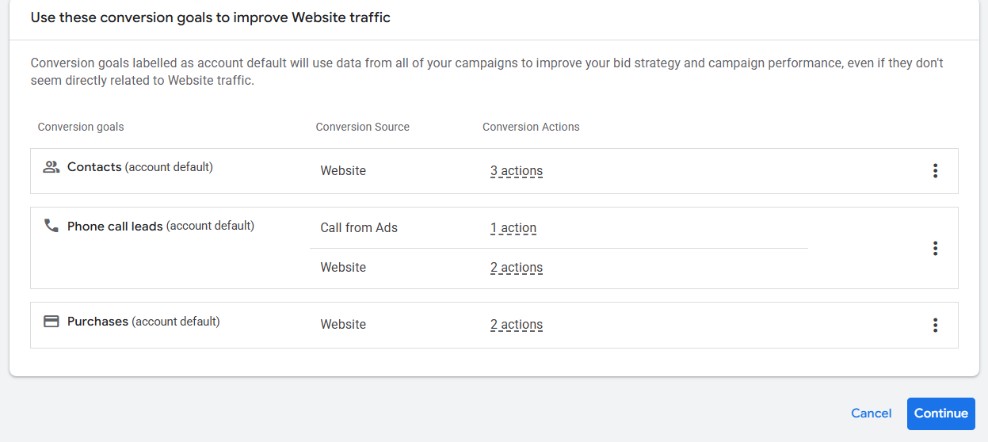
Tracked conversions are the key to understanding how well your ads are performing. If the tracking setup is incomplete, you could be missing important data and making decisions based on inaccurate information. It will also affect how Google’s algorithm manages your bidding strategy and performance.
What to do instead: Google Ads can automatically track a limited number of conversions, but they really are limited. Many booking platforms such as Shopify will automatically send tracking data, but you need to make sure you connect the booking platform to your Google Ads account. This is often done by adding a tracking code to the settings of your booking system – check the relevant support guides for specific details.
Beyond that, you should use a tracking system like Google’s Tag Manager. However, the setup of this is often beyond most small businesses, so you might need to hire an expert, or ask your developer to help.
Low Quality Landing Pages
Your ad could be the best one out there, but if it sends a user to a poor landing page, then it’s worthless.
When setting up ads, a lot of small business owners think about the ad and don’t consider what happens after the click. But the landing page is just as important as the ad itself – it can be the difference between a sale and no sale.
Common landing page mistakes I often see include:
- A page that’s irrelevant to the ad
- Tone of voice or branding that isn’t cohesive with the ad and/or the business
- The landing page is too general and doesn’t directly speak to the same content as the ad
- There’s no clear next step
- The copy and imagery is a second-thought and isn’t designed to move the user along the sales funnel
What to do instead: Incorporate landing page strategy into your whole ads setup. Consider the wording and imagery you use, as well as the next steps you want to encourage. Read my full guide to creating a successful ads landing page.

Budget Spread Too Thin
As a small business owner you’re likely to have a strict and limited budget. The mistake I often see is not that the budget is too low, but that the business is trying to do too much with it.
One of the biggest pros of Google Ads is that a small budget can go a long way – when done correctly, it’s one of the most cost-effective ways of advertising your business. However, you still have to accept the limitations of your budget. Spreading £5 a day across 5 different campaigns means very little opportunity for your ads to get seen.
What to do instead: If you have a limited budget, consider your main business goals and how an ads campaign will help. Seasonal campaigns can often be the best use of your budget, so think of using ads to promote a new product or a limited-time special offer. For longer-term ads, consider pushing your best-selling products, loss leaders, or high-value items.
In general, your ads will be more cost effective if you put a small budget into one campaign, rather than splitting it across multiple campaigns.
Unclear Ad Messaging
With ads, you have a limited amount of space and time to catch the attention of a user who is scrolling past or waiting to skip a video. Unclear messaging can exacerbate this disadvantage by confusing the user, or by not holding any interest for them at all. It could be an image that doesn’t resonate with the ask, an unclear indication of what the benefit is to the user, or an image that isn’t cohesive with the ad copy.
What to do instead: Carefully review your ad assets (including copy, image, video and calls to action) and consider how they work for your target audience. Is the wording generationally appropriate? Can your customers connect with the imagery? Is it clear what you’re offering them? Google Ads will also allow you to mix-and-match these assets so you can monitor performance to see what does and doesn’t work.
Targeting The Wrong Keywords
We’ve already discussed broad match keywords, but there are other ways to target the wrong keywords too. Google now incorporates a lot of machine learning into its ads and chooses keywords based on what it thinks you want. And, while this can be useful at times, it can also mean your ads are shown in the wrong searches.
User error or misunderstanding can also cause your ads to show in the wrong searches. It’s important to check the intention behind a keyword search before targeting it in your ads. That means understanding what the user hopes to discover through the search – is your service or product actually what they’re looking for? If not, you could be wasting your budget by targeting that phrase.
What to do instead: Firstly, carry out some comprehensive keyword research to understand what your customers are looking for and what searches are relevant to your business and campaign. Then you can incorporate your findings into your keyword targeting.
It’s also important to continually review the keywords that your ads are showing for. If they’re irrelevant or not working, you can add them to a negative keyword list. Negative keywords tell Google when not to show your ads, so it can help improve your results by filtering out poor-performing searches.
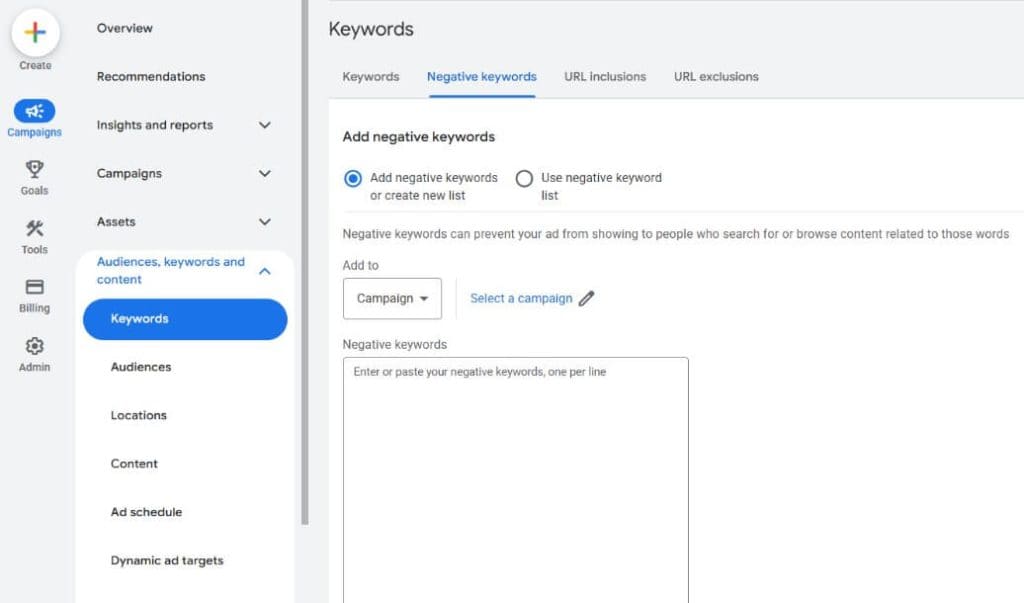
When choosing negative keywords, the obvious thing is to choose those that don’t relate to your business or your service area. But also consider relevant searches that are performing poorly. If a keyword seems as though it matches your business well, but costs a lot without bringing much in, it might be worth adding it to your negative keyword list. However, before doing this, make sure you check through the other points from this guide to see if anything else could be affecting performance.
Conclusion
Google Ads can provide a cost-effective way for small businesses to advertise their products and services, even with a limited budget. However, to get the most out of your ads, and to make them as cost-effective as possible, you should avoid common mistakes such as poor targeting, unclear ads, and thinly-spread budgets. Fine-tune these and you can get much more for your money.