

What are Google Ads Assets?
In Google Ads, the assets are what make up the ad: images, video, text, links, logos, and so on. Some, such as headlines and descriptions, are compulsory, while others are optional. However, the more assets you can include in your asset library, the more content your ads have to draw from, and the better their chance of success.
Find your asset library by logging into your Google Ads Account and, from the left menu, selecting Campaigns, then Assets.
How Are Assets Used?
Even if you add every possible asset to your library, they won’t necessarily be used all of the time. Google Ads will pick and choose those assets that work best for a particular ad, in a particular location, at a particular time and for a particular audience. It will then analyse the performance of each individual asset and pick those that get the best results based on your campaign goals, and use those more often.
If that sounds as though you have no control over how your ads look, then don’t worry. There are ways that you can choose what Google uses and where. I’ll go into that a little bit later.
Types of Ads Assets
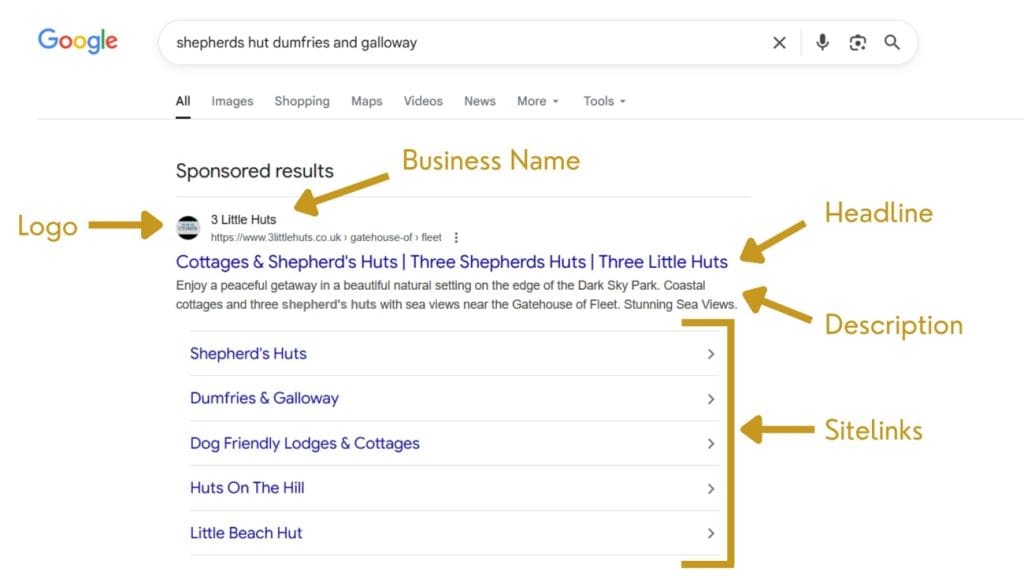
There are plenty of types of asset to choose from, though some are restricted to only certain kinds of ads. Here’s a quick look at what you can add to your library:
Images – A visual representation of your business, service or products. Image assets can come in all shapes and sizes.
Videos – Like images but even more engaging. You can also add three different video formats.
Business name
Business logos – You can upload your main logo, but also variations.
Sitelinks – Links to specific pages of your website with descriptions, such as Contact or Shop. Multiple sitelinks can appear under your main ad.
Headlines – A required asset that sits at the top of your ad and should grab the user’s attention.
Descriptions – Another required asset that expands on the headline and provides more information about your business, service or product.
Callouts – Short, additional snippets of text that highlight key offerings, such as free consultation or award-winning.
Structured snippets – Provide more details about your offering based on specific categories. For example, a list of clothing brands stocked or a list of services you provide.
Call assets – Add a call button to your ad.
Messages – Like a call asset, but for messaging systems such as WhatsApp or Facebook Messenger.
Lead forms – An embedded form so users can complete it as soon as they see your ad without having to click through to a separate page.
Locations – Details of your business location(s), including useful information such as address, contact details and opening hours.
Price assets – Showcase the cost of your goods or services directly in your ads.
App assets – Encourage downloads of your app.
Promotions – Advertise promotions such as limited-time offers and sales.
HTML5 – An advanced asset that makes your ads interactive. These types of ads are built with JavaScript, HTML and CSS.
How to Supercharge Your Asset Library
The key thing to remember is that your ads are only as good as the assets they’re created from. If you have poor imagery, unengaging copy, and limited assets, your ads will only go so far. Instead, follow these tips for supercharging your asset library and get the best results.
Make the Most of Available Assets
As I’ve already highlighted, there are lots of types of asset available, so you may as well make use of them. Though you don’t have to use every single asset for every ad, having a well-stocked library means that you (and Google’s automations) can swap options in and out to find the best-performing combination.
Keep Your Library Organised
There are three levels to your ads: the ads themselves, the campaign that they’re a part of, and the overall account. Assets can be assigned to each of these levels and organising them effectively can help you save time and keep your library neat.
Some assets, such as business name and logo, are likely to be used in most ads. Assign those to the account level so they can be easily linked to every campaign and ad.
For other assets, consider whether they’re relevant to every ad you’re ever likely to create, or if they’re specific to a certain campaign or audience. Images, video, promotions and headlines are some of the assets most likely to fall into these categories. For these, assign them to the right campaign or ad so you don’t end up with huge lists of irrelevant assets in every campaign.
Match Assets with Campaign Goals
To help keep your library organised, make sure to match your assets with your campaign goals.
It’s important to assess what you aim to achieve with your campaigns and assign assets based on those goals. If you include too many assets in one ad, you risk clouding your message, overwhelming users, and losing out on sales because of a lack of targeting.
For example, if your goal is to make more sales, then assets such as Promotions (e.g. free shipping or 25% off) could help boost performance. However, if you are trying to build an audience, you might instead use a Lead Form asset to have users sign up to a newsletter. There’s no point in adding free shipping to an audience-building campaign if you’re not yet trying to sell anything to that audience.
Create Niche Ads by Using the Right Assets
As well as using the right types of assets for campaign goals, you can niche individual assets even further so that each individual ad is more personalised. For example, if you have a campaign promoting a sale on homeware, you may have one ad that promotes candles, and one ad that promotes blankets.
Now, it’s obvious that you don’t want images of blankets on your candles ad, so you assign blanket images to the blanket ad only, and vice versa.
But you can go even further when you niche down.
Perhaps you know that the audience most likely to buy your candles is also more likely to buy other products. In that case, use a Callout asset to direct them to other similar products.
On the other hand, the audience that buys blankets may often have questions before purchasing. By using a Message or Call asset, you give them an easy way to get in touch with you.
Upload Multiple Versions of Images and Videos
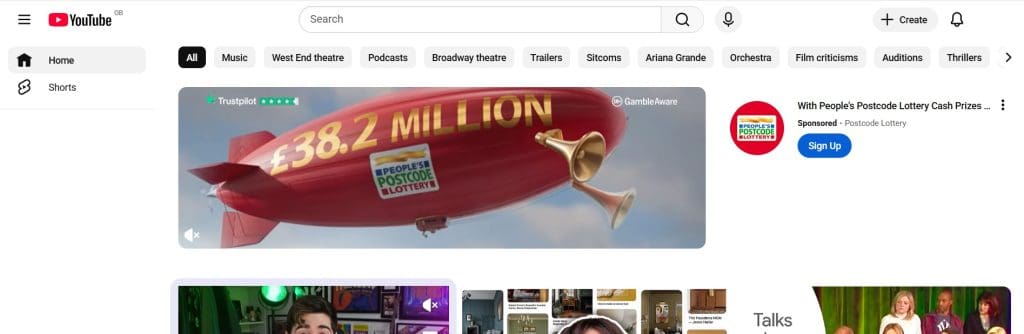
Google Ads are displayed in multiple places, with different dimensions and layout requirements for each. If all your images are, for example, landscape 4:6, then they may end up being badly cropped or not showing at all. Instead, add a variety of image shapes and sizes. You can upload the same image in three different dimensions (landscape, vertical and square), or choose completely different images in different ratios.
The same goes for video – at a minimum, you should include a landscape, a square and a vertical video for the best results.
Implement Keyword Research into Headlines and Descriptions
Do you know what your target audience is searching for? Keyword research can help you understand your potential clients’ pain points. If you can address these in a compelling manner in your ads, then you’ve got a better chance of getting clicks to your website and ultimately making a sale.
Quality Over Quantity
Although quantity can be a benefit when it comes to your asset library, that’s only if the assets are of a good quality. It’s much better to have 3 or 4 excellent Images or Descriptions rather than 50 low-quality equivalents. Remember that your ads may be the first impression a potential customer has of your business, so it’s important to put on a good show.
Make Regular Updates
If you’re running long-term ads, then it’s important to refresh them every now and again. You can do this either by updating the assets on your existing ads, or by developing new ads based on factors such as seasonal changes and new promotions.
Analyse and Assess
Google Ads provides a very handy summary of how well your assets perform based on conversions, impressions, interactions, total cost and cost per conversion. It’s important to analyse such data to ensure your assets are performing well and to make sure your budget isn’t being wasted.
Undertake regular reviews of individual assets and pause, replace or tweak any that aren’t helping your goals.
Conclusion
Assets – the text, images, links and videos that make up your Google Ads – can supercharge your ads when used to their best advantage. Utilise as many assets as possible where it makes sense for your campaign goals, use them to target niche audiences and get more conversions, and keep things fresh with regular reviews and updates.
For more, read my other guides to Google Ads, or get in touch to find out how I can boost your business by managing your digital advertising.