

What is Customer Experience (And How Does it Affect SEO)?
It’s important not to mix up customer experience with customer service. Service is part of the experience, but it is not the whole thing.
Customer experience is how people experience your entire business, from initially browsing your website, to purchasing a product, to interacting with your customer service team. A good customer experience eliminates all the sticking points, frustrations and blockers that could prevent you making a sale.
SEO is affected by customer experience, too. If your website visitors aren’t happy, search engines will often pick up on this and penalise your site as a result. That means less visibility in search, and even more difficulty attracting new customers.
A Plan for Success: Customer Experience Best Practices and Strategies
One of the best ways to understand the experience of your e-commerce store is to look at it from a user’s perspective. Imagine you’ve never seen the site before and need to find some information. How do you get to that information? Is it clearly laid out? Does it answer your questions?
If you can be objective, you can do this research yourself, but it would be even better to ask for help from someone who is unfamiliar with the site but who is similar to your customers. Their feedback will be invaluable in helping you approach these best practices and strategies.
Assess Your Menu Layout
The website menu (or menus) is the map of your whole site. Without it, users can’t find anything. But not all menus are made equally and, with large ecommerce sites in particular, creating one that’s easy-to-use can be difficult.
The menu (including sub-menus) should link to your most important pages. What this looks like will depend on the size of your online shop and your filters. For example, the menu may include all the different shop categories, or it may have just the top-level categories, with suitable filters on each page to narrow down further. Simpler drop-down menus look less overwhelming, but mega menus (with multiple layers) can help users get to what they want with fewer clicks.

Assess your current menu: are all the key pages on your menu, or is something missing? If pages aren’t on your menu, can they be accessed elsewhere (for example, via search functionality or on-page links)?
Provide An Appropriate Amount of Information
If you expect someone to part with their money, you need to give them a good reason to do so. Lots of things affect whether someone makes a purchase, but one thing that will help is providing the information they need.
Someone interested in buying a bike, for example, may want to know things like weight, number of gears, and frame size. They’ll want to see images of the different parts, and even a video or reviews. If you provide all the relevant information and your competitor doesn’t, then you have a better chance of winning that sale.
Information provision doesn’t end with products, either. Trust is an important purchase influencer, and you can build trust by sharing information about the business (for example, your ethos and unique selling points), demonstrating expertise through informative content, and displaying testimonials from previous customers.
Ensure All Policies Are Available and Easy to Find
Returns and delivery information is vital for e-commerce businesses, and if users don’t know what yours are, they may not buy. Firstly, ensure you have fair and legal policies in place, and then make sure they can be easily viewed. You may include links in your footer, or summaries on each product page, with a link to further information.
Display Contact Information
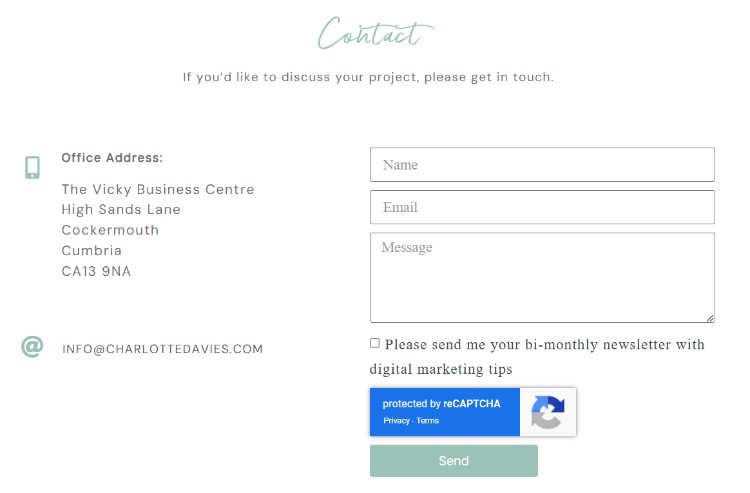
No matter how good the information on your website, there will always be people who have more questions, or who would rather ask than search for an answer. For this reason, and for returns, feedback, and more, it’s important to give customers and potential customers a way to get in touch with you. An email address or contact form is the absolute minimum, but if you can also provide a telephone number and a postal address, even better.
On-site AI chatbots can also improve customer experience and save your team time by providing quick answers based on your website content.
Don’t Forget Customer Service
Customer service is an important part of customer experience. If someone gets in touch, they’ll expect a reasonably quick, helpful and polite response. That goes for pre- and post-sales, because what happens after the purchase can determine whether or not the customer will leave a good review or come back for more.
You can manage customer expectations with an automated email that includes an FAQ and information on how long a personal response will take. And set up an automated series of emails post-purchase so users know exactly where their order is and when they can expect to receive it.
Create a Smooth Transaction Process
Your customers have found what they want, know all the information they need, have grown to trust you through reviews, and have started to make a purchase. But the checkout doesn’t work. Or payment is difficult, or they don’t receive an order confirmation email.
The checkout process should be the easiest win for e-commerce businesses. You’ve already done the hard work of converting a potential customer into an actual customer. They now just need to complete the purchase that they’ve already decided on.
But there is still time to fail at this last hurdle through a poor checkout experience, so it’s important that you make things as easy as possible. Check to ensure everything works as it should, choose a simple and trustworthy payment option (e.g. Paypal or Stripe, rather than asking them to make a bank transfer), and send an acknowledgement email once it’s all gone through.
These actions will not only ensure your customer can complete the purchase, it will increase the chances of a positive review or repeat custom in the future.
Test Everything From Multiple Devices

Testing is important for everything, but the devices used are just as essential as the actual testing. Everything might work well on a laptop, but what about a mobile or a tablet?
As about 70% of online purchases are made on a mobile, it’s vital that your site works on a multitude of devices. Test the checkout process, menus, layouts and forms on as many devices as you can to ensure consistency and good customer experience, no matter the technology.
Check Everything Regularly
E-commerce websites are an ever-evolving machine. Updates, plugins, edits and more can break something or cause issues. That’s why it’s important to check everything regularly: checkout process, content, form submissions, product layout, and so on. Make sure you review and test these regularly (at least monthly) to ensure everything continues to work as it should.
Customer Experience and E-Commerce: Final Thoughts
Customer experience goes well beyond answering emails and phone calls. It comes down to how easy customers (and potential customers) can interact with your business as a whole, from your website to your people. Provide plenty of information, pre-empt questions, make your site easy to navigate, and ensure your checkout process is smooth. These are some sure-fire strategies to increase sales and stand out against your competitors.