

What is Google Ads?
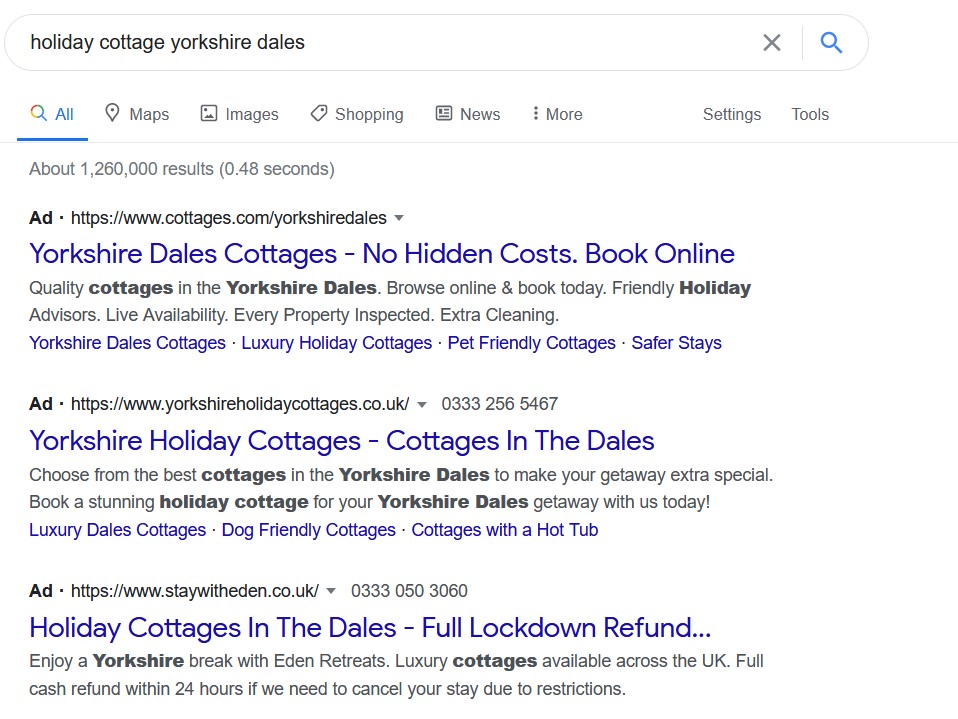
Google Ads is the most widely used Pay Per Click (PPC) platform in the world. You create an ad campaign and set a budget and Google Ads displays your ads to users who are likely to be interested. The ads can show up in a number of places including on Google itself, across Google products such as YouTube and Gmail, and on Google Search Partner sites like Amazon.
Setting Up Your Account
If you don’t already have an account, you’ll need to create one. Take a look at Google’s own guide to setting up an Ads account.
Setting up an account is completely free. You don’t pay anything until you start running ads, which gives you time to get to know the interface before launching your first campaign.
Auctions
Google Ads is an auction. Bids are made on keywords and, each time a user searches that keyword, or one similar to it, Google runs the auction and displays the winning ads.
But the winning ads aren’t necessarily the ones from the advertiser that makes the highest bid. Google also considers the relevance, potential and success of your ad, measured by a Quality Score.
The advantage of this method is that you can get excellent value for money while only showing your adverts to relevant people. In many other forms of advertising, you pay money to be seen by anyone and everyone, regardless of their interest in your product or service. With Google Ads – and a properly configured campaign – you only show up for those people who are likely to have a genuine interest in your promotion.
There are a limited number of advertising slots available, and some are more prominent than others, so it’s important to give your ads the best chance at winning an auction. The higher the Quality Score of your ad, the more likely Google is to place it in the most desirable slots.
Quality Score
Quality Score is calculated by Google based on three factors:
- How relevant your ad and landing page are to the specific keywords bid on;
- How likely it thinks someone is going to click on your ad; and
- The landing page experience and whether it corresponds to the ad.
A score between 1 and 10 is then assigned, with 10 being very relevant and 1 being not relevant at all.
During the auction, Google multiplies your Quality Score by your maximum cost per click (Max CPC – how much you’re willing to pay when someone clicks on your ad). It then assigns an overall score.
Here’s a simple example:
- Takeaway A has a Max CPC of 40p and a Quality Score of 3 = a score of 120.
Takeaway B has a Max CPC of 30p and a Quality Score of 9 = a score of 270.
Takeaway B will get the better advertising slot, because their overall score is better.
If, on the other hand, Takeaway A has a Max CPC of £1 (100p), their overall score would be 300, and so they would receive the top spot.
So, as you can see, focusing on a high Quality Score not only means that searchers are more likely to be interested in your ad, it’s also more cost effective.
Quality Score can be found in the Keywords section of your Google Ads account.
Campaigns and Ad Groups
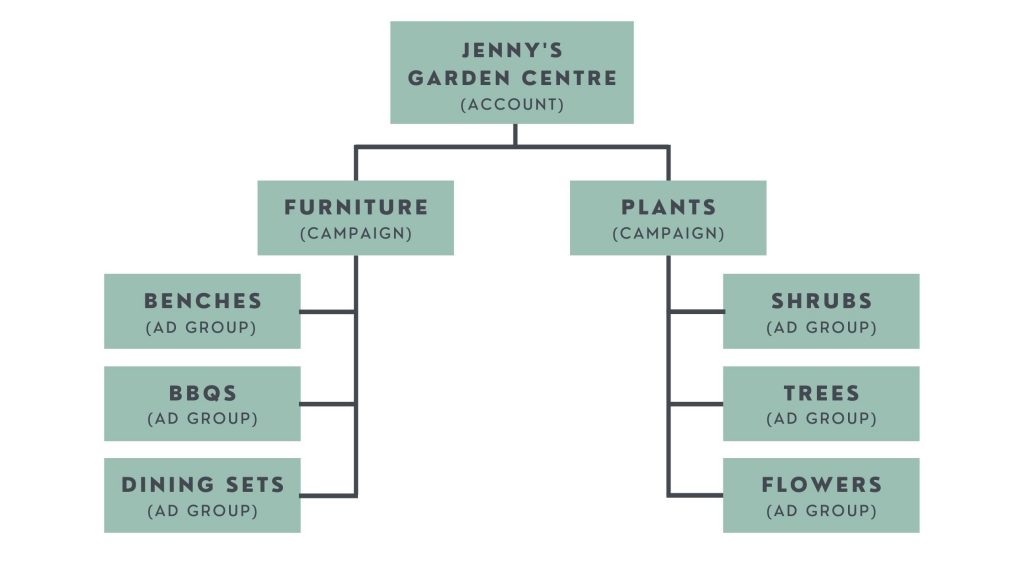
A Google Ads account is split into Campaigns, which are broken further down into Ad Groups, which are again broken down into Ads. You can have multiple of each depending on your requirements and strategy.
Campaigns
The Campaign level is where you set your budget and apply settings that will be relevant to all the Ad Groups in that Campaign. The settings include such things as location (where your ad will show up), language, ad type, and device targeting (which devices your ads are shown on).
This is where you adjust your settings with a focus on your overall advertising goal and the actions you want customers to take.
Campaign types
Performance Max (pMax) Use AI and machine learning to design and present the best possible ads in a number of formats and across multiple platforms. It’s almost entirely automated, so easy to set up for a beginner.
Search Text-only and show up in Google Search. You can also opt to have these show on Google Partner sites by selecting Search Network during set up.
Display These ads make use of image and video and are shown on Google partner sites and certain Google-owned properties such as YouTube.
Smart A particularly good option for small business owners who are just starting with PPC. You choose some basic information such as budget and business goals and then AI-powered features do the rest, monitoring the ads and adjusting them to get the best results.
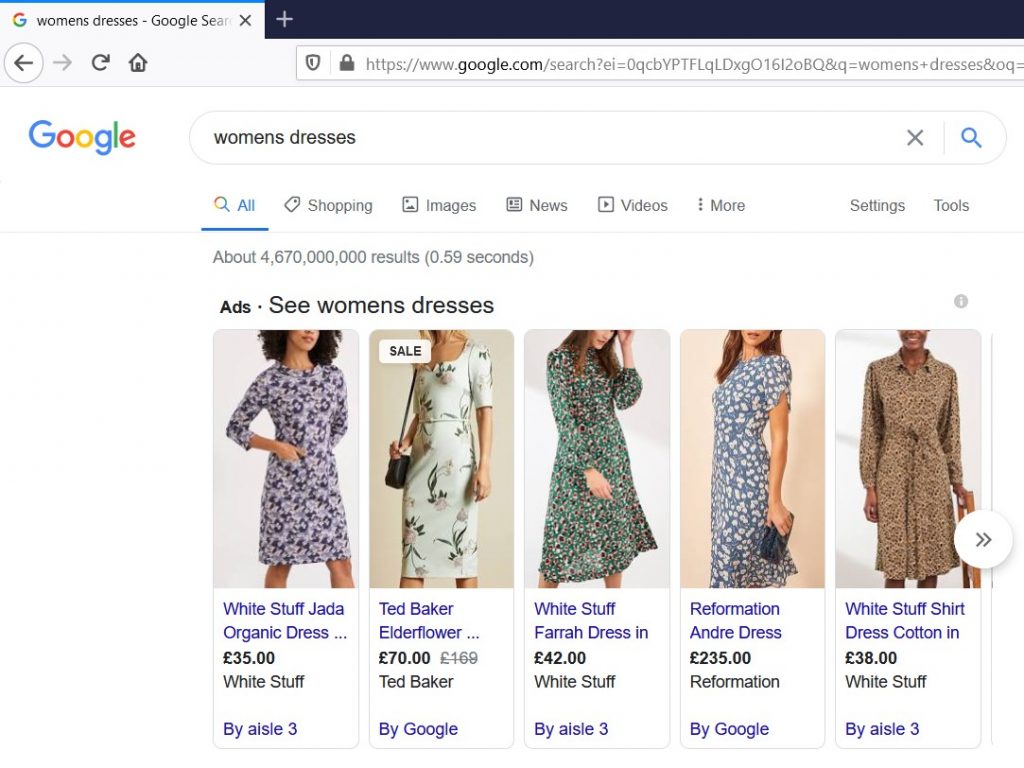
Shopping Showcase your products with an image and basic information on Google search pages. Also allows you to showcase stock in a physical store rather than just online.
Video Adverts on YouTube and other video sites. Can display before, during or after a video.
App Promote your app and encourage downloads. These ads extract information from your app to create adverts.
Discovery / Demand Gen Allows mobile users to find content that is relevant to them, without necessarily searching for it. Google shows ads on platforms such as YouTube and Gmail to users whose activity suggests they’d be interested. As of October 2023, Discovery campaigns can be upgraded to Demand Gen, which allow the use of video.
Local Services Encourages viewers to visit a physical venue. Often seen on Google Maps, but also in other locations such as Search and YouTube.
Ad Groups
Ad Groups are containers for your actual ads (i.e. what will be seen by your target audience). This is where target keywords are selected (for eligible ads).
Although you can create your ads and select your target keywords, you can’t control which ad shows up for which keyword, so it’s important to include only a small number of themed keywords in every Ad Group. That way, you can design ads that are highly relevant and will gain you a high Quality Score. You can delve deeper into strategy in my guide to Google Ads Campaign Strategies for Beginners.
Keywords
Keywords are the words or phrases that cause your ads to show up when people enter them into search engines such as Google. When you choose keywords for your ads, this is called targeting.
Note: you can’t always select your own keywords. Certain Campaigns don’t allow you to choose these and instead use AI and machine learning to pick them on your behalf.
It’s important to choose keywords that are going to be relevant for your ads. If you’re advertising a takeaway and you use a keyword like ‘restaurant’, this isn’t relevant, because someone searching that keyword is more likely to be looking for somewhere to sit in for a meal.
You should also try and find keywords that are used on a semi-regular to regular basis. If you target a keyword that no one ever actually searches, then your ad won’t be seen.
On the flip side, if you choose a very common keyword that lots of advertisers are targeting, you will either show up less, or have to pay more for a good position. Like with Search Engine Optimisation, you may need to experiment a bit to find a good balance between popularity and relevance: make sure you do plenty of keyword research.
Once you have been running ads for a little while, you can see which searches trigger your ads by going to Keywords > Search terms (or, in some platform versions, Insights and reports > Search terms) in the Google Ads menu. By analysing this data, you can narrow down your keywords and adjust them for more lucrative results.
Keyword match types
When you select a target keyword, you have the option to pick a match type. This identifies how exact you want Google to be when matching your ads with searches.
Broad match
Google will show your ad to people who search for your keyword, but also to people who are searching for similar keywords. These similar keywords may or may not include your target keyword.
For example, if you target ‘takeaway Cumbria’, your ad may be shown to people searching ‘takeaway Cumbria’, ‘takeaway pizza Cockermouth’, or ‘Chinese food Cumbria’.
This gives you the broadest range of possible visibility, but your ad may be shown in irrelevant searches and it will be more difficult to get a good Quality Score.
Phrase match keywords
Google will show your ads to people searching the exact phrase, or phrases with a similar meaning. For example, an ad targeting ‘takeaway pizza Cumbria’ may show up for ‘best takeaway pizza Cumbria’ or ‘pizza delivery Cumbria’ but not for ‘italian restaurant Cumbria’.
By being more specific in the phrases you target you reduce your potential audience, but are more likely to present an ad that’s highly relevant to those who are searching. That should lead to a higher click through rate.
Exact match keywords
Your ad will show for searches using that exact phrase, or for phrases with close variations or meaning the same thing. For example ‘takeout pizza cumbria’ but not ‘pepperoni pizza cumbria’.
This allows you to target users more closely, increasing your chances of a very relevant result. However, it can limit your audience, especially if you are using a phrase that doesn’t receive many hits.
Negative keywords
Negative keywords allow you to tell Google which searches you don’t want your ad to display for. You can use the same match types here, though it’s best to use exact matches and phrase matches.
An example of a negative keyword for ‘takeaway pizza Cumbria’ would be ‘takeaway kebab Cumbria’.
Ads
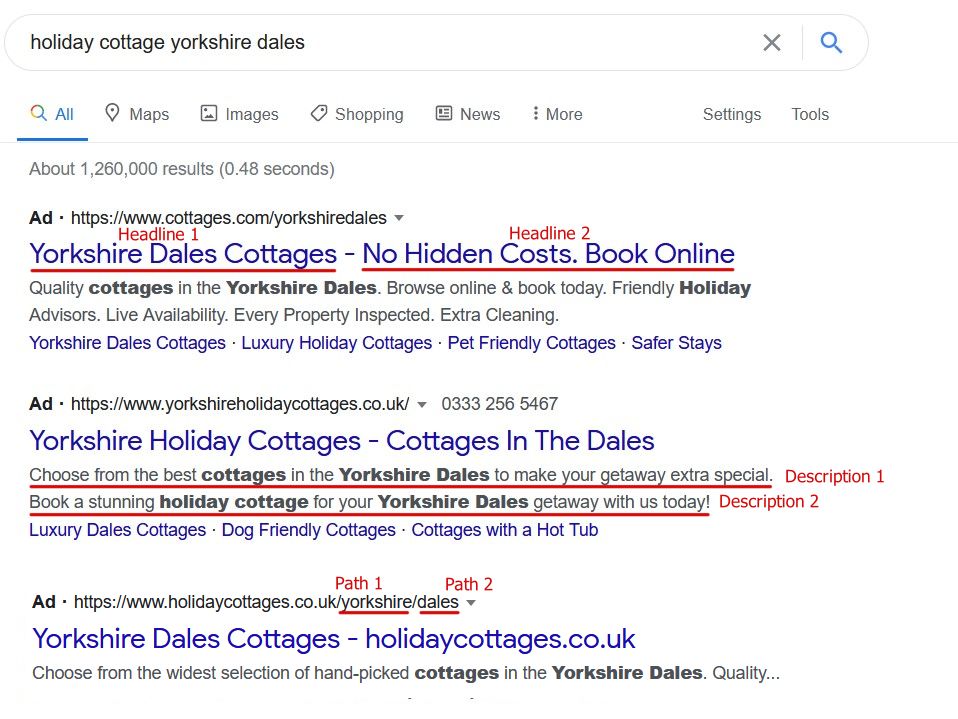
The ad itself is what users will actually see.
An ad is made up of several parts. Not all parts will show on every ad all of the time, and the parts available to you will depend on the type of Campaign and the targeting you’ve chosen. As you create the ad, Google will provide helpful information about what will show where and when.
The main parts of your ad are:
- Headline 1 (30 characters)
- Headline 2 (30 characters)
- Headline 3 (30 characters)
- Description 1 (90 characters)
- Description 2 (90 characters)
- Path 1 (A URL – 15 characters)
- Path 2 (A URL – 15 characters)
You may also be able to include other assets such as images and videos, depending on the type of ad, its placement, and your goals.
Ad formats
Depending on the campaign type, you will have different ad formatting options. Some of the most common include:
Text Text only ads that should include a call to action (CTA), a clear headline, and a brief description.
Image Utilises static images or GIFs in an ad space. Often seen on Google Partner websites.
Dynamic Give Google a selection of headlines, calls to action, and descriptions, and its AI will mix and match these when serving your ads in order to get the best results.
Video Use short-form video to better engage your audience.
Shopping Showcase products and brief details.
Landing Pages
A landing page is the first page a user sees when they click on your ad. To help your Quality Score, it’s important that these are highly relevant to your ad. For example, if you advertise takeaway pizza products, it’s better to have a landing page that’s specifically about the types of pizza people can order, rather than your website homepage or a page with multiple types of product.
Metrics
Metrics tell you how your ad is performing. It’s helpful to measure these, and Google Ads provides lots of information to help with monitoring. Some of the most commonly useful metrics are:
Cost Per Click (CPC) or Cost Per Engagement The number of clicks on your ad divided by your total spend. This is good for seeing how costly your ad is.
Impressions How many times your ad has been seen (but not necessarily clicked on).
Total Spend How much you’ve spent on your Campaign within a certain period.
Click Through Rate (CTR) or Interaction Rate The number of times people have clicked on your ad compared to how many impressions it has had. In general, the higher the CTR, the better.
Cost Per Conversion A conversion can be anything from buying a product to submitting a contact form, from making a phone call to downloading an app. You will need to define and setup your conversions in order for Google to track them, either directly via Google Tag Manager or by importing GA4 data. The Cost Per Conversion tells you how much you spend for every person who converts. It is an important part of Google’s smart bidding.
Return on Ad Spend (ROAS) How much you’ve made from ads compared to how much you’ve spent, usually given as a percentage. For example, if you spend £100 and make £300, your ROAS is 200%. To get this figure, you will need to set up e-commerce tracking to include purchase price and import the data as above. This helps Google’s smart bidding to work effectively.
Google Analytics
To dig even deeper into your metrics, connect your Google Ads account to Google Analytics (GA4). That way you can get more information about your audience, how they behave when they land on your website, and if there are any issues with the customer journey. Take a look at my Guide to Google Analytics.
Conclusion
While Google Ads has many advanced features that require expert management and understanding, there’s also a lot you can do with the basic options. With so much flexibility, helpful metrics, and cost-effective options, Google Ads is a highly appealing option for any small business interested in paid advertising.